 overseasales@jwele.com.cn
 English

 Login


Digital Signage Media Player Selection Guide: Entry-Level, Mainstream, and High-Performance Platforms
A digital signage media player is a dedicated commercial computing endpoint that renders, schedules, and distributes visual content to one or more displays while supporting the connectivity, control, and fleet-management needs of unattended deployments. For retail, kiosks, transportation, hospitality, banking, and public information systems, the media player should be selected by content workload, display topology, I/O, network, environmental conditions, and manageability—not by treating every compact PC as the same product category.
JWIPC's commercial Media Player portfolio is structured into H, K, and L series tiers. The company's ISE 2025 materials position H as entry level, K as mainstream, and L as high performance. That hierarchy gives B2B buyers a practical way to match a signage project to the right compute envelope without incorrectly substituting a Consumer Mini PC for a purpose-built commercial signage terminal.
How the H, K, and L Series Differ
The H/K/L media-player structure is a performance-and-deployment hierarchy in which entry-level H systems prioritize low power and simplicity, K systems target mainstream multi-display signage, and L systems provide higher compute and display capability for demanding commercial installations.
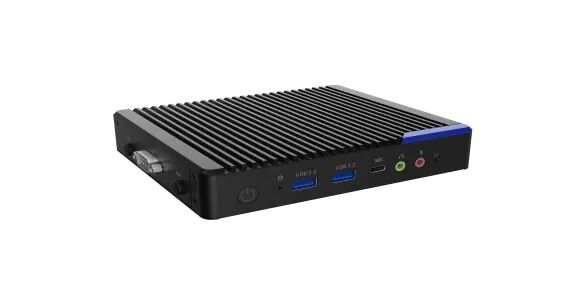
Representative current products are H125, the K115 Series, and L106. H125 uses Intel Alder Lake-N/Twin Lake, adopts a fanless design, supports up to 16GB DDR4, and provides triple-display capability. The K115 Series is designed for 4K digital signage and multi-display use, with Intel Core U-series positioning and four-display capability in JWIPC's signage materials. L106 moves to Intel Alder Lake desktop-class processors with a 65W TDP, up to 128GB DDR4, dual LAN, serial I/O, and up to 8K DisplayPort output.
Selection tier | Representative model | Platform / power class | Display difference | Memory difference | Best-fit deployment |
Entry | H125 | Intel Alder Lake-N / Twin Lake, 6–15W | Triple display, 4K-class outputs | Up to 16GB DDR4 | Single-site signage, information release, interactive kiosk, cost-sensitive fleets |
Mainstream | K115 Series | Intel Core U-series platform | Up to four displays in JWIPC signage materials | Higher mainstream PC-class capability | Retail campaigns, 1x4 or 2x2 video walls, richer 4K content |
High performance | L106 | Intel Alder Lake desktop CPUs, 65W | 2 x HDMI 4K60 + DP up to 8K60; three displays | Up to 128GB DDR4 | Flagship stores, heavier content, more peripherals, higher compute headroom |
The table excludes features that do not materially differentiate the models. All three can be part of managed signage deployments, so the comparison focuses on power class, display capability, memory headroom, and workload tier—the parameters most likely to change the design decision.
Choose by Content and Display Topology
Content-and-display sizing is the process of matching the media player to the number of screens, resolution, codec workload, animation complexity, browser rendering, and interactive content used in the final signage layout.
A static menu board and a four-screen synchronized promotion wall are different workloads even if both use 4K panels. Buyers should document the number of simultaneous outputs, per-screen resolution and refresh rate, video codec, browser or CMS engine, number of concurrent video streams, transitions, web content, and whether interactive input is required. For multi-screen projects, validate the actual layout on the target displays instead of assuming that "four HDMI ports" automatically guarantees the required synchronization behavior.
For projects evaluating intel nuc digital signage style deployments, the more useful buying question is whether the selected media player provides the right commercial display outputs, unattended-operation functions, and lifecycle support for the project.
Retail and Kiosk Projects Need Commercial I/O
Commercial signage I/O is the set of display, USB, serial, network, wireless, and control interfaces required to connect the media player to displays, touch panels, sensors, scanners, payment peripherals, cameras, and site networks.
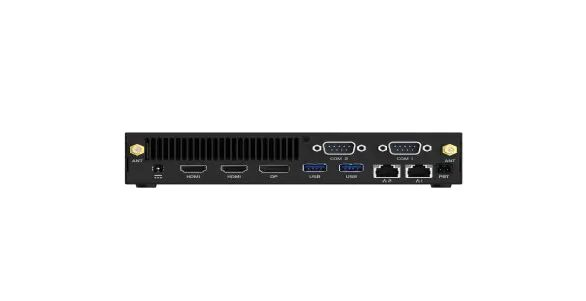
H125 includes serial connectivity and optional 4G/5G, which is useful for information release and kiosk-like deployments where WAN flexibility matters. L106 provides two RS232 ports, dual Ethernet, Wi-Fi options, and optional cellular connectivity, giving integrators more room for peripherals and remote sites. The I/O plan should be created from the peripheral BOM: list every touch controller, scanner, camera, printer, payment terminal, sensor, and external control device before the media player is selected.
A technical article on digital signage player hardware should therefore compare the interfaces that change integration cost rather than repeating ports that are identical across products.
Fleet Reliability Depends on Unattended Operation
Unattended-operation reliability is the ability of a signage endpoint to recover, restart, and continue delivering content with minimal on-site intervention across long operating hours.
For signage fleets, buyers should verify watchdog behavior, auto power-on, RTC scheduling, recovery after power loss, OS update policy, content-player auto-start, remote health monitoring, and storage-write patterns. H125's published specification includes watchdog, auto power-on, and scheduled power functions. Similar operational controls should be confirmed on the exact K/L project configuration before deployment. Reliability should be evaluated with a long-duration content loop and the final CMS, not inferred only from component specifications.
Security and Remote Management for Multi-Site Signage
Signage security and remote management are the controls used to protect the endpoint, restrict user access, maintain the operating system, and update content or applications across distributed locations.
Public-facing systems should use a locked-down user experience, least-privilege accounts, controlled update windows, secure boot and TPM where available, and a documented recovery path. Microsoft's Assigned Access can be used to configure Windows kiosk experiences for single-app or restricted multi-app scenarios. For hardware, the K115 Series and L106 are positioned with business manageability/security features on supported configurations, but the exact CPU and firmware configuration should be confirmed when vPro or TPM is a project requirement.
When to Move From H to K to L
Tier migration is the decision to move from an entry to mainstream or high-performance media player only when the real workload exceeds the lower tier's validated capability.
· Choose H-class when the workload is fixed, power efficiency matters, a fanless design is preferred, and the display/peripheral count is moderate.
· Move to K-class when the project requires richer 4K content, more simultaneous displays, stronger PC-class processing, or larger mainstream retail deployments.
· Move to L-class when the project needs desktop-class compute, more memory headroom, 8K-class output, dual LAN/serial integration, or significantly heavier local applications.
· For every tier, validate the final CMS, codecs, browser engine, displays, peripherals, and network behavior on the production-intent sample.
Conclusion
A digital signage media player should be treated as a commercial endpoint category with its own performance, display, I/O, management, and lifecycle requirements. JWIPC's H/K/L structure makes the selection logic clear: H for entry-level and low-power signage, K for mainstream 4K and multi-display deployments, and L for higher-performance applications with greater compute and I/O headroom. The best B2B selection process starts with the content and peripheral BOM, validates the complete display topology, and freezes a production configuration that can be supported across the planned rollout.
FAQ
This FAQ section defines practical answers to common procurement and deployment questions so buyers can validate requirements before requesting a quotation.
Is a digital signage media player the same as a mini PC?
No. They can share x86 components, but JWIPC classifies Media Players separately from Consumer Mini PCs because signage products are designed around commercial display, unattended operation, multi-display, and peripheral requirements.
Which JWIPC series is entry level for digital signage?
JWIPC positions the H series as entry level. H125 is a current example using Alder Lake-N/Twin Lake with a fanless design and triple-display capability.
When is the K115 Series a better fit than H125?
The K115 Series is a better fit when the project needs more mainstream PC-class performance and up to four displays for richer 4K signage or multi-screen layouts.
Why choose L106?
L106 is appropriate when the project needs desktop-class Intel processing, up to 128GB memory, dual LAN, serial interfaces, and up to 8K DisplayPort output.
What should be tested in a digital signage pilot?
Test the final CMS, codecs, browser content, number of screens, resolution/refresh rate, touch and peripherals, network failover, auto-start behavior, power recovery, OS updates, and long-duration playback.
Can Windows be locked down for public-facing signage?
Yes. Windows supports kiosk and restricted-user configurations through features such as Assigned Access. The exact design should be validated with the production application and security policy.
External References
These references provide standards or platform context used for further technical validation. They are listed separately so the article body remains focused on JWIPC products and buyer decisions.
· Microsoft Learn — Windows Kiosk and Assigned Access


